entra-id troubleshooting entra connect update failed due to modified miisserver.config
Broken update and errors
I ran into a pretty strange issue during an Entra Connect upgrade that I thought would be worth sharing  .
.
I was upgrading to version 2.5.190.0, and everything looked fine at first—the binaries installed without any complaints. But when the configuration wizard kicked in, things took an unexpected turn. Unfortunately, I no longer have the screenshot, but the error message said something along the lines of:
TaskSchedulerAdapter: Exception encountered while getting settings for sync
scheduler task Azure AD Sync Scheduler.
...
Details: ERROR: The system cannot find the file specified.
...
There was an issue obtaining cloud sync intervals --->
System.IO.FileLoadException: Could not load file or assembly
'System.Diagnostics.DiagnosticSource, Version=6.0.0.1, Culture=neutral,
PublicKeyToken=cc7b13ffcd2ddd51' or one of its dependencies. The located
assembly's manifest definition does not match the assembly reference. (Exception
from HRESULT: 0x80131040)
And the stack trace… well, it was a nasty one  .
.
The key clues pointed straight to assembly‑loading problems. It was pretty clear that something wasn’t lining up correctly—either a version mismatch or a missing binding redirect somewhere in the configuration.
First steps
Being a little impatient and noticing the issue was tied to
System.Diagnostics.DiagnosticSource I decided to temporarily move the
System.Diagnostics.DiagnosticSource.dll file out of the Entra Connect
installation directory. Since this was just a lab environment, it felt safe
enough to experiment.
This was enough to finish the upgrade, still I’ve seen errors in the application log and was not sure that the upgrade is in a good condition. I decided to dig further.
Fusion log
A long long time ago in a galaxy far away I’ve already debugged similiar issue, I think it was related to FIM Certificate Lifecycle Management. The details don’t really matter anymore. What does matter is that it reminded me of Fusion log and a little tool called Fuslogvw.exe.
If you have somewhere a working Visual Studio installation, all you need is to
copy the NETFX 4.8 Tools directory and run the fusion log viewer.
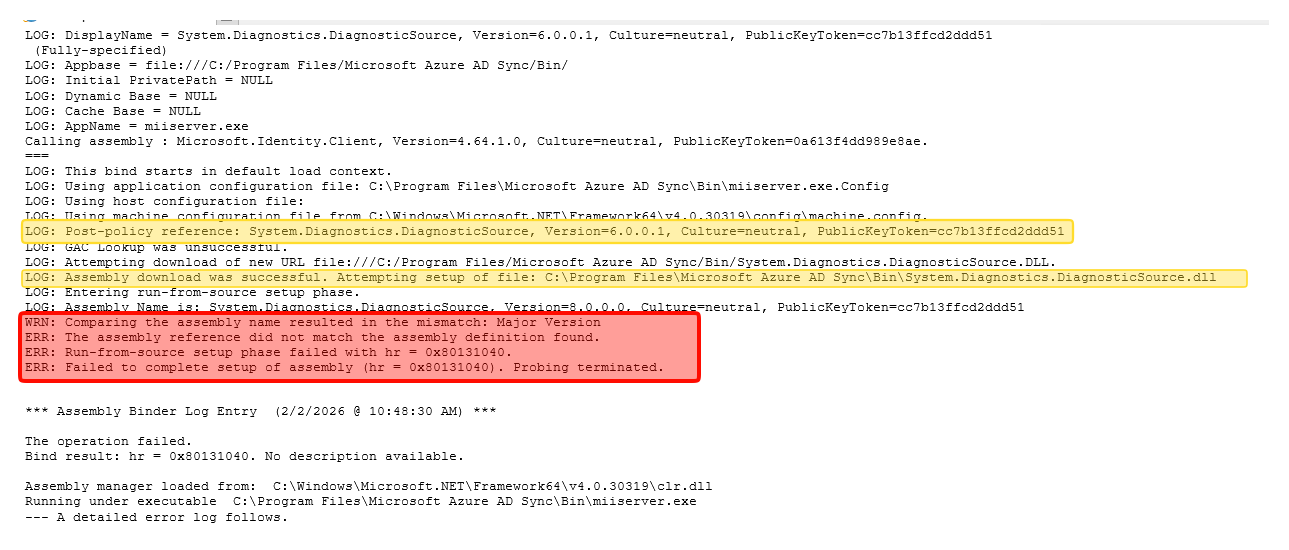
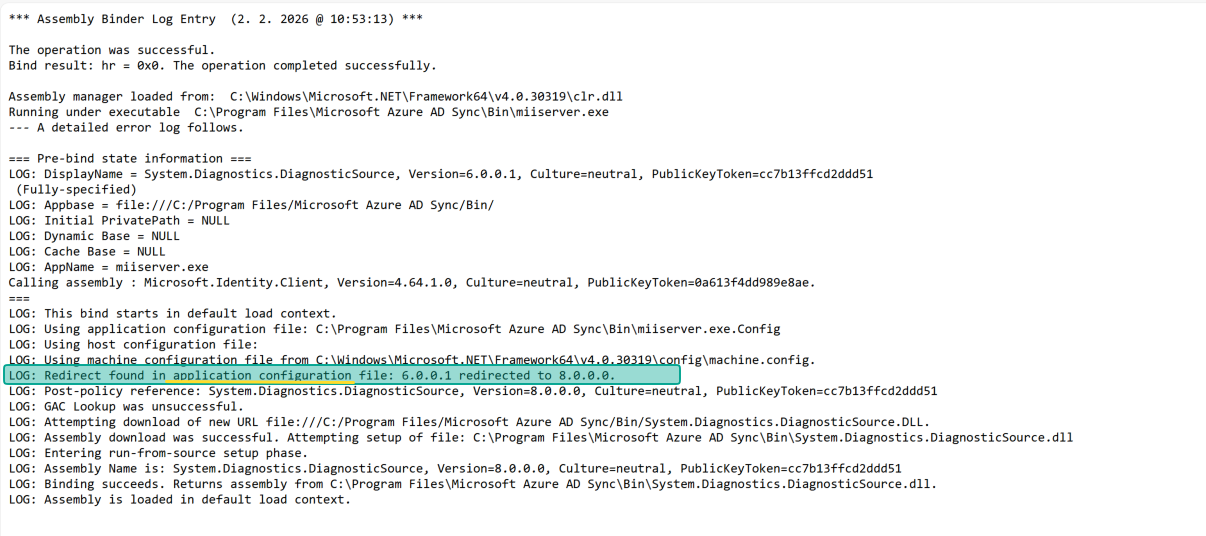
I enabled Fusion logging and ran a few tests. I had two machines to compare: one where the new Entra Connect version was running perfectly, and another where the upgrade failed.
Knowing that the error was bound to System.Diagnostics.DiagnosticSource
I’ve checked the loading of this assembly.
On the machine where the update failed I’ve seen loading errors.
On the second machine it was successfuly loaded due the assembly binding redirects. Please note that the redirect is found in application configuration file.
Comparing miiserver.config
Since I’ve spent enough time in the FIM/MIM world, I knew that miisserver.config
was the right place to look. And even if you didn’t know that upfront, the
Fusion log would point you in that direction anyway .
I grabbed both configuration files and compared them side by side in a text
editor. As you can see, important part, especially related to System.Diagnostics.DiagnosticSource is missing.
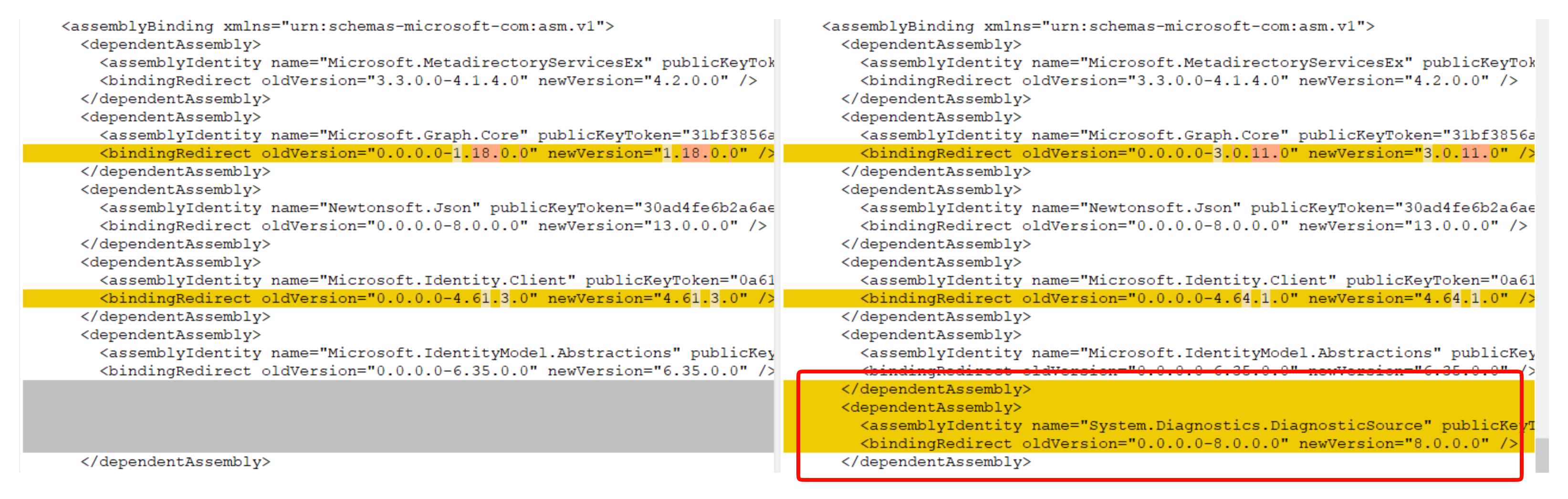
I’ve updated the miiserver.config accordingly, and everything started working as charm.
Root cause
Now I was still curious why the miiserver.config was not updated. Knowing
what was the issue, I decided to check the logs in the %ProgramData%\AADConnect folder.
I’ve searched the Synchronization Service_Install-<DATE>-<TIME>.log file
for miiserver.config. Finally I found this

The installer noticed that miiserver.config had been modified and, as a result, chose not to overwrite it during the upgrade.
I checked the installation logs to be sure nothing else was skipped, and fortunately there were no other risky or outdated files left behind. So overall, the upgrade looked clean and everything continued to work as expected.
Now, you might be wondering: why on earth would I modify the miiserver.config file in the first place? One possible reason is FIPS  . If your servers enforce FIPS‑compliant algorithms, you have to adjust
 miiserver.config accordingly, just as Microsoft describes in their knowledge base.
Now I never heard of any breach being prevented by using FIPS compilant algorithms, but I can name a few situations where having “Use FIPS compliant algorithms for encryption, hashing, and signing” cause sysadmins a headache. But that is just an old man speaking inside my head.